

Rethinking Tech: One Family’s Journey Into Digital World
In today’s world, technology often gets a bad rap when it comes to children. Many parents worry about screen time, online safety, and the potential for distraction. But for Paul Wojnicki, our travel writer and a father of two young children, the story is quite different. He believes that technology, when chosen wisely and used intentionally, can be a powerful force for learning, creativity, and connection. In this article, he shares how his family has embraced apps, games, and devices not as digital babysitters, but as springboards for developing real-world skills and passions.
Early learning with trusted names
We were using apps to get Harrison and Ella started with their maths and reading skills well before they started nursery. Of course, finding the right apps can be tricky and many are plagued with adverts or in-app purchases. We started with the BBC’s CBeebies learning app as it was packed with fun learning games and used characters familiar to them from the Cbeebies channel. There are no in-app purchases or adverts and the games are all based on the Early Years Foundation Stage Curriculum, so it’s the ideal introduction for pre-school children. We also liked Khan Academy Kids, one of the top-rated educational applications, which has activities for maths, reading, social skills and emotional development.
We’ve learned languages together
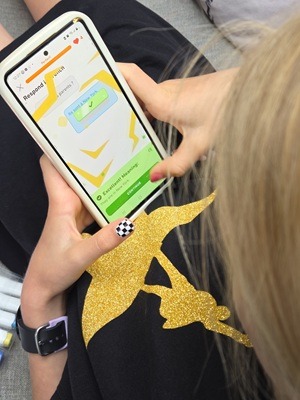 Our family’s favourite app over the last two years has been Duolingo, which we’ve been using to learn French. Harrison is on a 700+ day “streak” and Ella on a streak of over 350 days. They haven’t missed a day in all that time, which is great, but both been known to come downstairs in a blind panic in the middle of the night after waking up and being convinced they’ve missed their ten-minute French lesson. Apart from offering tuitions for 40+ languages, Duolingo have also branched out into maths and is great for working on numeracy skills. There are pro-plans but we’ve never felt the need to subscribe and have found the free activities have been more than enough to keep us going.
Learn how to code
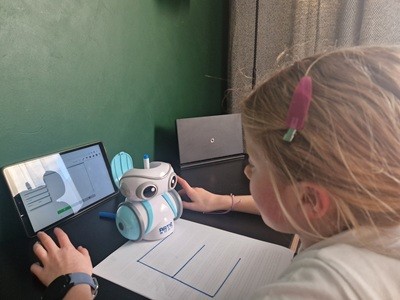 Ella first learned coding skills on ScratchJr, which is aimed at ages 5-7. We found it was a great app to introduce coding using visual programming blocks to snap together commands to animate characters, create scenes, and build her own projects. It encouraged creativity, problem-solving, and logical thinking in a playful environment. Later, we invested in a coding robot, which allowed her to use similar block based commands to experiment with real-world robotics and really develop her understanding of sending commands to a physical object, as well as her problem solving skills.
Fostering creativity
Our kids love nothing more than making things, and while I would argue that making things from wood, cardboard and papier-mache is far more satisfying than drawing a picture on a screen, these two things don’t have to be mutually exclusive. After a recent visit to a gaming museum and developing a fascination with Atari Pong, Harrison started building his own Pong controllers using Arduino Uno and electronics kit. We did this together and used ChatGPT to guide us, it was a great bonding experience and introduced him to using AI for constructive purposes. He also loves to make miniaturised football trophies on his 3D printer. Ella has always enjoyed making cards and stickers and now uses a Cricut machine to print designs to iron onto t-shirts for her and her friends, as well as making personalised stickers and cards for them on birthdays.
Learn an instrument
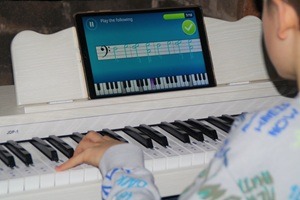 Apps like Simply Piano and Yousician are great ways to help learn an instrument. Harrison picked up piano incredibly quickly using Simply Piano and learns more from the app than he does from his piano lessons run by our local authority. I’ve been happy to pay for the pro plan, but there are plenty of free exercises on both apps too. Of course, nothing compares to private lessons with individual feedback from a tutor, but not everyone can afford this or fit it into their schedule. The beauty of Simply Piano and Yousician is that they’re done at home at a time that suits you. They also adapt to your child’s learning pace and actively encourage practise through “rewards” and stars.
Don’t forget the advantages of gaming
Contrary to the stereotype of technology isolating children, it can strengthen social bonds when used responsibly. Multiplayer online games, such as Minecraft or Roblox, promote teamwork and collaboration. In Minecraft’s creative mode, children work together to build elaborate structures, requiring negotiation, planning, and compromise. Harrison has even learned the basics of flying a small plane and glider on a couple of simulators, and he plans to join a gliding club when he turns 14. We took a tour of the club recently and were surprised to find they used the same software on their own simulator.
One of the most significant advantages of technology for growing children is its ability to enhance cognitive development. Educational apps, interactive games, and online learning platforms have really helped our children’s learning journey, and for the most part we’ve had very little in the way of negative experiences. Technology is simply a tool. It can be used well or poorly, helpfully or harmfully. As parents, it’s not about banning screens altogether—it’s about making conscious choices. By curating what children engage with and taking part in the journey, we can ensure that tech supports their development rather than distracting from it. The difference lies not in the device, but in how we use it.



As a home educator we use tablets as there are a couple of truly excellent apps – especially Reading Eggs, which got our kids from 0 to Roald Dahl in about 10 months 🙂
Some really great advice, technology can be really useful for kids, with the right protections and time management in place.
we love Duolingo. Will definitely be giving scratchjr a look!
Some solid advice on the use of technology.
Some great ideas to try. It’s always a battle with screens but these look fun and educational.